Home Blog Page 12

Huawei’s Nova 11 Series: A Matte Rear Panel, a Cylindrical Camera Bump, and More!

0

Chinese technology giant Huawei is preparing to launch the Nova 11 series of mid-range smartphones. According to a recent tip on Weibo from Classmateguan, the new series is set to be unveiled on April 17, 2023. This comes just two weeks after the introduction of the Huawei P60 series, marking a critical move for the company.

The upcoming Nova 11 series is expected to be available in two new colors, Frosted Purple and Frosted Green. The back of the phone will feature an oval-shaped camera module with three vertically aligned lenses and a significant ring in the middle. A circular cavity will also be present in the primary camera, adding a unique touch to Huawei’s design.

In terms of display, the Nova 11 will boast a flat panel with slim bezels, providing a high screen-to-body ratio. The selfie camera will be positioned via a punch hole in the upper center of the screen. A second microphone and stereo speaker will be on the upper side.

The Huawei Nova 11 is expected to have a matte rear panel and a cylindrical camera bump that houses an influential 108 MP (Pro model) or 50 MP (regular model) camera system. Moreover, the phone will be the first mid-range smartphone to feature satellite communication technology, enabling SMS sending even without network coverage.

Huawei has yet to provide an official launch date for the Nova 11 series information is expected to be announced soon. The swift release of the new series following the P60 series indicates Huawei’s aggressive push into the smartphone market. Once the Nova 11 series is launched, Huawei will likely launch a new marketing campaign to showcase its latest product.

The countdown begins: Google confirms AI chatbot for search, but release date still unknown

0

For many years, Google Search has dominated the market for search engines, but introducing cutting-edge AI chatbots like ChatGPT might seriously threaten the computer giant. Google must catch up with Microsoft, which has already integrated AI into its Bing search engine. According to Sundar Pichai, CEO of Google, a Google Search AI chatbot is under development, although many details are yet unknown.

Here are the specifics: In an interview with The Wall Street Journal, Pichai talked about the creation of an AI Search chatbot. He said that users would “definitely” be able to interact with language learning models while searching. Pichai withheld more details, like the release date or whether this chatbot would be built on Google Bard, which debuted in March.

The nature of competition has changed as AI chatbots gain popularity in the search engine industry. Microsoft’s Bing search engine already has an AI chatbot, and OpenAI’s ChatGPT has become a serious competitor. To keep its hegemonic position, Google must act rapidly. In 2021, search, which is Google’s primary source of income, generated $162 billion. It may suffer severe financial repercussions if its market share is lost to AI chatbots or even Bing, which has frequently been made fun of.

One of the biggest threats Google has ever faced is the creation of a Google Search AI chatbot, which is essential to overcoming these difficulties. Despite CEO Sundar Pichai’s confirmation that the company is developing a search AI chatbot, many unanswered questions remain. Google must act rapidly to preserve its supremacy and safeguard its revenue as AI chatbots continue to change the search engine landscape. Industry insiders and users alike will be eagerly following Google’s next move in AI because rivals like Bing and ChatGPT have already made progress.

Leaked Promo Image Reveals Vivo Y100A; Specs and Price Information Surfaced

0

The Vivo Y100A, a new Y-series phone, is anticipated to go on sale in India soon. Recall that the business debuted the Dimensity 900-powered Vivo Y100 in India in February of this year. The iQOO Z7 5G, which made its debut in India last month, is the basis of the Y100A, which has been modified.


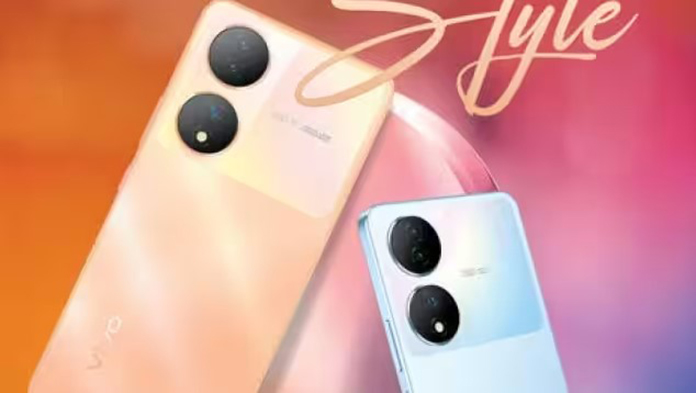
A picture promoting the Vivo Y100A shows that it will come in blue and gold. The gadget has a triple-camera unit with OIS and an LED flash. The device has a power key and a volume rocker on the right edge.
The Vivo Y100A has 256 GB of storage and 8 GB of RAM. It has a fingerprint scanner built into the display as well. The advertisement also states that buyers of the Y100A would receive Rs. 2,000 cashback when they make an EMI transaction with ICICI (credit card EMI, debit card EMI, and full swipe credit card), SBI (CCEMI), IDFC (CCEMI, DCEMI), Federal (CCEMI), Yes Bank (CCEMI), and AU Bank (CCEMI). The deal is good through April 30.


Mahesh Telecom, a shop located in Mumbai, has revealed the Vivo Y100A’s technical details. The smartphone will have a 6.38-inch AMOLED screen with Full HD+ quality, a 16-megapixel front-facing camera, and a triple camera setup with 64-megapixel (primary), 2-megapixel (depth), and 2-megapixel (macro) resolution. It will utilize the Android 13 operating system underneath a layer of FunTouch OS.

The Dimensity 920 chipset, 8 GB of RAM, and 256 GB of storage will all be included in the Y100A. A 4,500mAh battery with 44W rapid charging will be inside. According to rumours, the smartphone will cost Rs 26,999 (about $330) in India. Also, it is claimed that the Y100A would target the offline market.

Xiaomi 13 Ultra: The Next Level of Smartphone Photography

0

The Xiaomi 12S Ultra, which had a large 1-inch Type-C 50MP primary camera, was available only in China, making it incredibly difficult to buy. Xiaomi, on the other hand, wants to make the 13 Ultra more widely available. They plan to release it in international markets soon after it comes out in China.

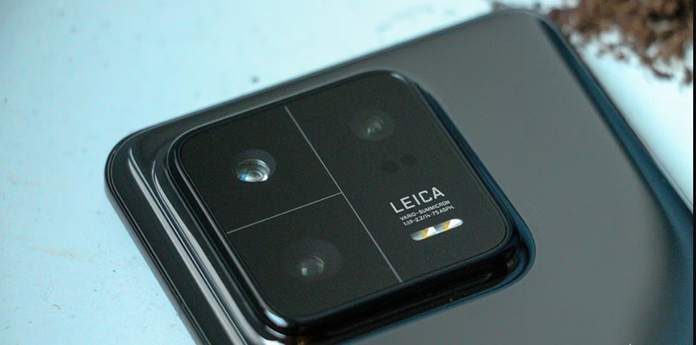
Xiaomi says that it and Leica worked together to make the “perfect Summicron lens” and the “latest optical system solution” for the 13 Ultra. The firms believe this will be a watershed moment in mobile imaging.
While it is unknown which camera sensor will be used in the 13 Ultra, it is expected that Xiaomi and Sony will maintain their tight collaboration, with the Sony IMX989 sensor a strong possibility. According to rumors, the sensor may be combined with a variable aperture lens, which could explain the firms’ remark.


The Xiaomi 13 Pro features a 50MP primary camera and a 3.2x telephoto shooter with a floating lens that can focus on objects up to 10cm away. As we await the release of the Xiaomi 13 Ultra, it will be exciting to watch how Xiaomi and Leica’s collaborative efforts will raise the bar for smartphone image.

Microsoft Edge Continues to Innovate with New Collaboration Tool and AutoPlay Blocking Update

0

The public beta version of Microsoft Edge now has many new features, all of which are meant to make it easier for users to work together, be honest, and use the internet.
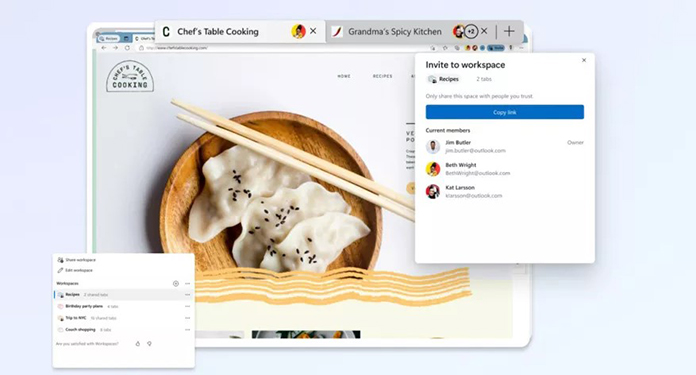
Workspaces were first shown to the public in October 2022. They let people share a group of browser tabs with other people. The tool will be accessible via a new button in the Edge browser’s upper left corner. You can open a new workspace window with a unique name and color scheme by clicking it. Collect whatever tabs you desire, then click the Share Workspaces button, giving you a hyperlink to share. If those receivers choose to, they can keep adding to the tab group before sending it back to you.

Workspaces, according to Microsoft, is “not browser screen sharing, nor does it share browser data” “with others in a group. According to the release, “confidential data such as logins, cookies, [or] passwords” would not be shared either. People only see the tabs.
Before using Workspaces in Edge, you must first have a Microsoft account (obviously) and a recent version of the Edge browser on either a PC or Mac. While this is a limited preview, not everyone will be able to test the function, but there are plans to expand it to more users in the future “over the next several months.” Workspaces are now limited to five invitees; thus, groups will be tiny.


The following significant change is the return of autoplay blocking with a new block setting that disables all automatic media playback on websites. Initially, the Limit option allowed you to disable auto-playing videos on previously visited sites. One caveat to this feature: Autoplay blocking is only available in the Canary Channel version of Microsoft Edge (opens in a new tab), so you’ll need to install the other browser, and even then, only a select few will be able to test it. There are, however, initiatives to increase user availability.

The Performance Hub is more restrictive than Browser Essentials, a metrics panel that will eventually replace it. It describes primary “performance and safety features like Efficiency Mode, Sleeping Tabs, and SmartScreen scanning.” You can see how many websites Edge analyzed to see whether there was any malware lurking and how many risky downloads it banned.
According to the release timetable, Browser Essentials will be available on Edge 112, which is presently being rolled out (opens in a new tab). If you still need the update, Microsoft says you may try it by joining the Windows Insider Programme’s Canary or Dev channels. If you see a heart icon in the toolbar, you have it.


Because these are works in progress, the company is asking consumers for feedback. Each feature has its way of providing input, such as thumbs up or thumbs down in the menu. We did contact Microsoft to find out when everything would be available. This story will be updated in the future.

Discord vs Slack: Which One Is Right for Your Team?

0
Discord vs. Slack

Introduction

Effective team communication is essential for success in today’s fast-paced world. Two popular systems, Discord and Slack, have emerged as the top choices for teams wishing to streamline their communication. While both platforms have comparable functionality, their target audiences and unique characteristics suit them for various use cases. To help you select the best communication solution for your team, this article compares Discord and Slack in detail.

History and Background

History and Background of Slack vs Discord

Discord

Discord, which debuted in 2015, initially aimed to provide a communication network for gamers. It has grown dramatically, gaining users from various businesses and specialties. Its adaptability and feature set have made it a popular platform for creating online communities and boosting team collaboration.

Also Read: How to Create and Customize Your Discord Account?

Slack

Slack was started in 2013 as a way for people to talk to each other at work instead of using email and to make it easier for teams to work together. Thanks to a strong emphasis on integrations, Slack has expanded and can now serve a wide range of users, including corporations, schools, and non-profit organizations.

Key Features and Differences

User Interface

Discord has a slick, dark-themed UI with customization options. Moreover, it allows for the simultaneous use of many server connections.

Slack has a simple, easy-to-use interface with changeable color schemes and layouts. Workspace connections are distinct, requiring users to transition between them.

Communication Channels

Channels are used to arrange conversations in both Discord and Slack. Discord refers to these as “servers,” while Slack calls them “workspaces.” Public and private channels are available on both platforms, but Discord also allows for creating voice channels.

Also Read: Promoting Your Discord Server: Strategies for Attracting New Members

Direct Messaging

Both platforms offer one-on-one and group messaging via direct messaging. However, Slack provides more advanced search features, making locating individual messages or files in chats easier.

Voice and Video Calling

Discord and Slack let you make voice and video calls, but Discord stands out thanks to its dedicated voice channels and low-latency audio. With screen sharing and annotation features, Slack video calls are better suited for corporate meetings and presentations.

File Sharing and Storage

You can share files up to 8 MB in size (or 100 MB with a Nitro subscription), and there are no storage limits. The organization and search of files, however, are restricted.

Slack lets you share files up to 1 GB, but how much you can store depends on your chosen plan. Advanced file organization and search features are provided.

Integrations and bots

Slack is known for having a large library of integrations and bots, making it perfect for businesses that use many different products every day. Discord also offers integrations and bots but is less comprehensive than Slack.

Also Read: Top 5 Discord Music Bots: Bring the Party to Your Server!

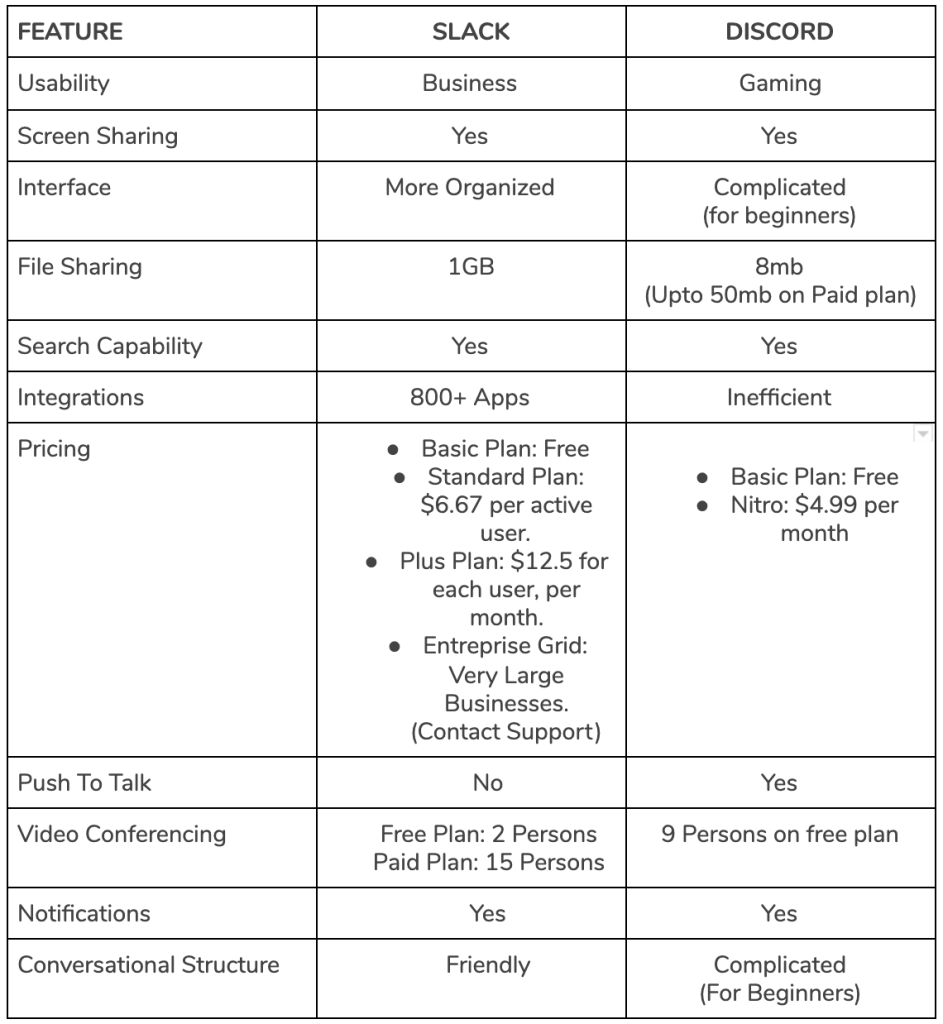
Features and Differences of Discord and Slack

Discord vs Slack for Specific Use Cases

Discord vs Slack Use Cases

Discord vs Slack for Business

Discord and Slack have valuable features for business communication, but their strengths depend on your company’s needs.

Pricing: Discord has a free plan with basic features, while Slack only lets you search through the last 10,000 messages. Nitro, Discord’s paid plan, is more for individual users than organizations, while Slack’s paid plans are primarily for businesses and give them more features and complete chat histories.

The broad app integrations that Slack offers can expedite company procedures. Discord is ideal for remote teams prioritizing real-time collaboration since it excels at voice and video communication.

With features like single sign-on (SSO) and compliance certifications, Slack pays a lot of attention to enterprise security. Discord may provide a different level of data protection than Slack, even though its security has improved.

Discord vs Slack for Community

Both Discord and Slack have clear advantages when it comes to making and managing online communities.
Slack’s workspace structure is better for smaller groups and teams, while Discord’s server structure and many moderation tools make it easier to manage large communities.

Public Server Discoverability is a feature of Discord that lets users quickly find and join groups that interest them. On the other hand, Slack requires invitations to join workspaces, making it less appropriate for public groups.

Discord’s voice channels and streaming capabilities make real-time participation inside communities possible. Slack’s emphasis on text-based communication may enable a different level of connection.

Discord vs Slack for Work

Both platforms have advantages and disadvantages regarding communication and collaboration linked to work.
Slack’s app integrations with significant project management tools like Trello and Asana give it an advantage in task tracking and organization. Even though Discord has bots for simple project management, it might need to be more complete.

Because it has excellent voice and video calling features, Discord is a great option for remote and hybrid teams that need to communicate in real time. Slack’s focus on text and its ability to work with third-party apps make it a better fit for groups that value text-based communication and collaboration.

Commonly Asked Questions

How is Discord different from Slack?

Discord and Slack differ in numerous fundamental areas:

  • Target audience: Slack was made for businesses to talk to each other, while Discord was first made for gamers.
  • Pricing: Discord has more free features and lower-cost plans, whereas Slack’s free tier has more limitations, and its subscription plans are often more expensive.
  • Voice and Video Calling: Discord features built-in voice channels, making real-time conversation smoother. Slack provides voice and video calls, typically for one-on-one or small-group discussions.
  • Server organization: Discord uses servers to organize communities and channels, while Slack uses workspaces and organizations.

Is Discord better than Slack?

If Discord is better than Slack, it depends on your team’s specific needs and preferences. Discord is great for gaming communities or informal groups because it has a more laid-back atmosphere. On the other hand, Slack has a more organized platform for working together in the office and more powerful ways to connect business products.

Why are Slack and Discord so similar?

Slack and Discord both strive to simplify communication and cooperation. Text-based channels, direct messaging, file sharing, and voice and video chat options are all available. These similarities can make selecting the right platform for your team difficult, so analyzing each platform’s distinct features and benefits is critical.

Is Slack Better than Discord?

Slack might be a better option for your team. Slack is a more business-oriented network that focuses on productivity and workplace communication. It also offers more extensive integration possibilities with popular business apps such as Google Workspace, Trello, and Asana. Slack may be a better option for organizations that want a professional environment and advanced collaboration options.

Conclusion

Discord and Slack have a lot of features that make it easier for teams and communities to talk to each other and work together. The main differences between the two platforms are their target audiences, pricing, ability to make voice and video calls, and how the servers are set up.

When choosing the right platform for your organization, think about the goals and preferences of your team as well as how each platform can be used. Discord might work better for gaming communities, informal groups, or teams with limited money or other resources. At the same time, Slack might be perfect for businesses and professional teams that want a well-organized platform with many ways to connect.
In the end, you should choose between Discord and Slack based on a thorough comparison of their pros and cons, considering your team’s needs and how you want to communicate.
OnePlus Nord CE 3 Lite: Specs, Features, and Release Details for the Latest OnePlus Smartphone

0

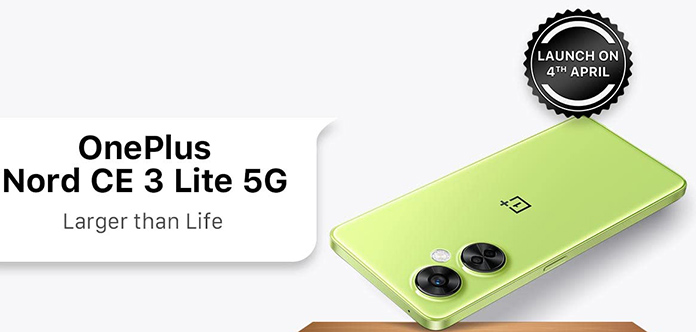
OnePlus has recently launched the Nord CE 3 Lite smartphone in India, which is a mid-range 5G device with impressive features such as a 108-megapixel primary camera and a Snapdragon 695 CPU. According to recent leaks, the phone will also be released in other markets, including the United States. However, it is now confirmed that the Nord CE 3 Lite will be rebranded as the Nord N30 for the US market, replacing the Nord N20.

A member of the OnePlus forums claimed that the Nord CE 3 Lite software build files provide proof of the rebranding. The Nord N30 features a larger screen than the previous model, measuring 6.71 inches and refreshing at 120 Hz instead of 60 Hz. However, the new screen is an LCD rather than an AMOLED. Additionally, the camera has been upgraded from a 64MP to 108MP device.

The Nord CE 3 Lite has an FHD+ resolution and a 120 Hz refresh rate. It features two camera rings on the rear panel and a side-mounted fingerprint scanner that doubles as a power button. The smartphone has three back cameras, including a 2MP depth lens, a 2MP macro camera, and a 108MP primary sensor with 3x lossless zoom. For selfies, it boasts a 16-megapixel front-facing camera.

Powered by the Snapdragon 695 SoC, the Nord CE 3 Lite has 8GB of RAM and 8 GB of virtual memory technology. It comes with a 5,000mAh battery that supports 67W rapid charging capabilities and storage options of 128GB and 256GB. The device runs on OxygenOS 13.1, based on Android 13, and will receive two years’ worth of OS upgrades and three years’ worth of security patches.

Connectivity options include a USB-C port, WiFi, Bluetooth 5.3, 5G, and a 3.5mm socket.

Summary:

  • OnePlus has released the Nord CE 3 Lite smartphone in India, which will also be released in other markets.
  • The phone will be rebranded as the Nord N30 for the US market, replacing the Nord N20.
  • The Nord N30 features a larger screen than the previous model, measuring 6.71 inches and refreshing at 120 Hz instead of 60 Hz, but the new screen is an LCD rather than an AMOLED.
  • The camera has been upgraded from a 64MP to a 108MP device.
  • The Nord CE 3 Lite has 8GB of RAM, and 8 GB of virtual memory technology, and is powered by the Snapdragon 695 SoC.
  • It comes with a 5,000mAh battery that supports 67W rapid charging capabilities and storage options of 128GB and 256GB.
  • The device runs on OxygenOS 13.1, based on Android 13, and will receive two years’ worth of OS upgrades and three years’ worth of security patches.
  • Connectivity options include a USB-C port, WiFi, Bluetooth 5.3, 5G, and a 3.5mm socket.

Xiaomi to Host Launch Event for Smarter Living 2023 on April 13

0

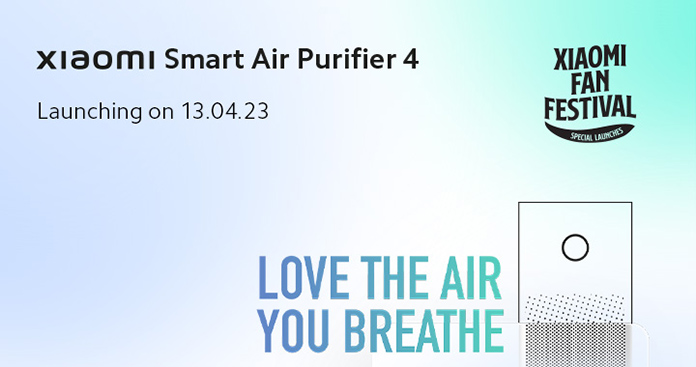
Xiaomi announced the worldwide launch of its new flagship smartphone, the Xiaomi 13 Ultra, in April. The India branch of the company has now revealed that a launch event will be held on April 13 at 2 p.m. The event, Xiaomi Smarter Living 2023, is expected to introduce new intelligent home products, as the event’s teaser hints. The launch poster released by Xiaomi has quietly revealed up to six new gadgets that are likely to debut at the event. The company’s dedicated microsite confirms this information.

In addition to a new air purifier that could be called the Air Purifier 4 series, Xiaomi will introduce new air fryers, robot vacuum mops, trimmer kits, and smart TVs. Although the microsite has confirmed the Air Purifier and Trimmer Kit, more information on the other products will be revealed as the event approaches.

Xiaomi has a history of launching new products at Smarter Living events. Last year’s event introduced the Mi NoteBook Pro, Mi TV 5X Series, Mi Smart Band 6, Mi Router, Mi 360-degree Home Security Camera, and Mi Running Shoes. The event on April 13 is expected to be no different. It is worth noting that the Xiaomi 13 Ultra will not be sold in Turkey, Japan, Indonesia, or India, as the Mi 11 Ultra has been sold in these markets. The new device will be shipped to other markets instead.

Summary:

  • Xiaomi to launch new products at Smarter Living 2023 event on April 13
  • Up to six new gadgets are expected to be introduced at the event
  • New air purifiers, air fryers, robot vacuum mops, trimmer kits, and smart TVs will be launched
  • Xiaomi 13 Ultra will not be sold in Turkey, Japan, Indonesia, or India
  • Previous Smarter Living events have seen the launch of several new products

Top 5 Discord Music Bots: Bring the Party to Your Server!

0
Top 5 Discord Music Bots Bring the Party to Your Server!

Introduction

Music is crucial in fostering community engagement and enhancing the user experience in Discord servers. With the growing popularity of Discord music bots, server administrators can now quickly provide an entertaining and engaging atmosphere for their members. In this article, we will explore the top 5 Discord music bots that cater to the needs of music lovers, ensuring an immersive audio experience in your server. We have selected these bots based on their features, supported platforms, ease of use, and overall performance.

Rythm Bot: The Ultimate Music Experience

Rythm Bot

Rythm bot overview

Rythm Bot is a highly-regarded music bot for Discord, designed to offer users an exceptional audio experience. With a user-friendly interface and many features, Rythm Bot has become the go-to choice for many Discord server administrators.

Features and Benefits

  • High-quality music streaming
  • Supports multiple platforms (YouTube, Spotify, etc.)
  • Easy-to-use commands
  • Customizable audio settings

Supported platforms

Rythm Bot supports various platforms, including:

  • YouTube
  • Spotify
  • SoundCloud
  • Twitch
  • Vimeo

Rythm bot commands

Basic playback commands

  • Play
  • Pause
  • Resume
  • Skip
  • Stop

Playlist and queue management

  • Add songs to the queue
  • View the queue
  • Remove songs from the queue
  • Shuffle the queue
  • Save and load playlists

Audio effects and customization

  • Volume control
  • Equalizer settings
  • Bass boost
  • Pitch and speed adjustments

Rythm bot discord integration

How to add Rythm bot to a server?

  1. Visit the official Rythm Bot website.
  2. Click on the “Invite” button.
  3. Choose the server you want to add the bot to.
  4. Grant the necessary permissions.
  5. Complete the authentication process.

Configuration and setup

  1. Assign Rythm Bot to a specific voice channel.
  2. Configure bot permissions for different roles.
  3. Adjust settings, such as default volume, and equalizer presets.
  4. Set up custom command prefixes for easier usage.

Also Read: How to Create and Customize Your Discord Account?

Groovy Bot: Your Personal DJ

Groovy Bot

Groovy bot overview

Groovy Bot is another top-rated Discord music bot that has earned its reputation through high-quality music streaming and a user-friendly interface. Its extensive list of features and support for popular platforms like YouTube, Spotify, and Apple Music guarantees a versatile music selection for your server.

Features and Benefits

  • High-quality audio streaming
  • Supports multiple platforms (YouTube, Spotify, Apple Music, etc.)
  • Easy-to-use commands
  • Customizable audio settings

Supported platforms

Groovy Bot supports various platforms, including:

  • YouTube
  • Spotify
  • Apple Music
  • SoundCloud
  • Deezer

Groovy bot commands

Basic playback commands

  • Play
  • Pause
  • Resume
  • Skip
  • Stop

Playlist and queue management

  • Add songs to the queue
  • View the queue
  • Remove songs from the queue
  • Shuffle the queue
  • Save and load playlists

Audio effects and customization

  • Volume control
  • Equalizer settings
  • Bass boost
  • Pitch and speed adjustments

Groovy bot discord integration

How to add Groovy bot to a server?

  1. Visit the official Groovy Bot website.
  2. Click on the “Invite” button.
  3. Choose the server you want to add the bot to.
  4. Grant the necessary permissions.
  5. Complete the authentication process.

Configuration and setup

  1. Assign Groovy Bot to a specific voice channel.
  2. Configure bot permissions for different roles.
  3. Adjust settings, such as default volume, and equalizer presets.
  4. Set up custom command prefixes for easier usage.

FredBoat: A Powerful Discord Music Companion

FredBoat

FredBoat overview

FredBoat is a feature-rich Discord music bot that caters to music lovers by providing a seamless and enjoyable audio experience. Its support for various platforms, including YouTube, Spotify, and SoundCloud, ensures a diverse range of music options for your server members.

Features and Benefits

  • High-quality audio streaming
  • Supports multiple platforms (YouTube, Spotify, etc.)
  • Easy-to-use commands
  • Customizable audio settings

Supported platforms

FredBoat supports various platforms, including:

  • YouTube
  • Spotify
  • SoundCloud
  • Bandcamp
  • Twitch

FredBoat commands

Basic playback commands

  • Play
  • Pause
  • Resume
  • Skip
  • Stop

Playlist and queue management

  • Add songs to the queue
  • View the queue
  • Remove songs from the queue
  • Shuffle the queue
  • Save and load playlists

Audio effects and customization

  • Volume control
  • Equalizer settings
  • Bass boost
  • Pitch and speed adjustments

FredBoat discord integration

How to add FredBoat to a server?

  1. Visit the official FredBoat website.
  2. Click on the “Invite” button.
  3. Choose the server you want to add the bot to.
  4. Grant the necessary permissions.
  5. Complete the authentication process.

Configuration and setup

  1. Assign FredBoat to a specific voice channel.
  2. Configure bot permissions for different roles.
  3. Adjust settings, such as default volume, and equalizer presets.
  4. Set up custom command prefixes for easier usage.

Hydra Bot: Unleash the Power of Music

Hydra Bot

Hydra bot overview

Hydra Bot is a versatile Discord music bot designed to provide server members with an engaging and immersive music experience. With support for multiple platforms, including YouTube, Spotify, and SoundCloud, Hydra Bot ensures a wide variety of music options for your server.

Features and Benefits

  • High-quality audio streaming
  • Supports multiple platforms (YouTube, Spotify, etc.)
  • Easy-to-use commands
  • Customizable audio settings

Supported platforms

Hydra Bot supports various platforms, including:

  • YouTube
  • Spotify
  • SoundCloud
  • Mixcloud
  • Vimeo

Hydra bot commands

Basic playback commands

  • Play
  • Pause
  • Resume
  • Skip
  • Stop

Playlist and queue management

  • Add songs to the queue
  • View the queue
  • Remove songs from the queue
  • Shuffle the queue
  • Save and load playlists

Audio effects and customization

  • Volume control
  • Equalizer settings
  • Bass boost
  • Pitch and speed adjustments

Hydra bot discord integration

How to add Hydra bot to a server?

  1. Visit the official Hydra Bot website.
  2. Click on the “Invite” button.
  3. Choose the server you want to add the bot to.
  4. Grant the necessary permissions.
  5. Complete the authentication process.

Configuration and setup

  1. Assign Hydra Bot to a specific voice channel.
  2. Configure bot permissions for different roles.
  3. Adjust settings, such as default volume, and equalizer presets.
  4. Set up custom command prefixes for easier usage.

Jockie Music Bot: Revolutionize Your Server’s Music Experience

Jockie Music Bot

Jockie music bot overview

Jockie Music Bot is a powerful Discord music bot that aims to revolutionize the music experience on your server. With a user-friendly interface and support for multiple platforms like YouTube, Spotify, and SoundCloud, Jockie Music Bot delivers a comprehensive music selection for your community.

Features and Benefits

  • High-quality audio streaming
  • Supports multiple platforms (YouTube, Spotify, etc.)
  • Easy-to-use commands
  • Customizable audio settings

Supported platforms

Jockie Music Bot supports various platforms, including:

  • YouTube
  • Spotify
  • SoundCloud
  • Bandcamp
  • Twitch

Jockie music bot commands

Basic playback commands

  • Play
  • Pause
  • Resume
  • Skip
  • Stop

Playlist and queue management

  • Add songs to the queue
  • View the queue
  • Remove songs from the queue
  • Shuffle the queue
  • Save and load playlists

Audio effects and customization

  • Volume control
  • Equalizer settings
  • Bass boost
  • Pitch and speed adjustments

Jockie music bot discord integration

How to add Jockie music bot to a server?

  1. Visit the official Jockie Music Bot website.
  2. Click on the “Invite” button.
  3. Choose the server you want to add the bot to.
  4. Grant the necessary permissions.
  5. Complete the authentication process.

Configuration and setup

  1. Assign Jockie Music Bot to a specific voice channel.
  2. Configure bot permissions for different roles.
  3. Adjust settings, such as default volume, and equalizer presets.
  4. Set up custom command prefixes for easier usage.

Also Read: Promoting Your Discord Server: Strategies for Attracting New Members

How to Choose the Best Discord Music Bot for Your Server

When selecting a music bot for your Discord server, consider the following factors:

Features and functionality: Evaluate the bot’s capabilities and choose one that aligns with your server’s needs.

Supported platforms: Ensure the bot supports multiple music platforms, such as YouTube, Spotify, and SoundCloud, for a diverse music selection.

Ease of use and customization: Opt for a bot with user-friendly commands and customizable audio settings to cater to your server’s preferences.

Server size and performance impact: Consider the bot’s performance and resource usage, especially if your server has many members.

Pricing and premium options: Assess whether the bot offers a free version or requires a subscription for premium features.

Conclusion

The top 5 Discord music bots – Rythm Bot, Groovy Bot, FredBoat, Hydra Bot, and Jockie Music Bot – offer unique features and capabilities to enhance your server’s music experience. Integrating the right music bot allows you to foster engagement, create an entertaining atmosphere, and personalize your server’s audio settings to cater to your community’s preferences. So, choose the ideal bot for your server and bring the party to your community!

Samsung’s Next-Gen Tablet, the Galaxy Tab S9 Ultra, Could Offer Impressive Performance and Durability Upgrades, According to Leaked Specs

0

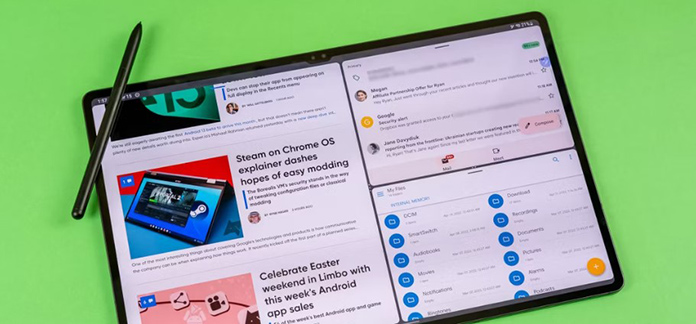
The Galaxy Tab S8 Ultra is one of the best tablets made by Samsung, known for its high quality and performance. A new and enhanced model, the Galaxy Tab S9 Ultra, is in the works for release later this year. The new tablet will include a bespoke CPU, possibly extra memory, and an IP68 water resistance rating, according to well-known leaker Ice Universe. The Galaxy Tab S8 Ultra had a maximum RAM capacity of 16GB, but the new tablet might start with that amount and provide even more in higher-end models.

The IP68 classification, which would make the Galaxy Tab S9 Ultra dust- and water-resistant (a feature not present in prior generations), is one of the most interesting speculated additions. It would then be comparable to Apple’s iPad Pro. Only some things are going to change, though. The screen and body sizes, display resolution, and battery life of the Galaxy Tab S9 Ultra are anticipated to remain unchanged from those of its predecessor.

The only notable difference might be a slight weight gain of about 11 grams compared to the Samsung Tab S8 Ultra. Samsung will likely unveil the new tablet later this year at an Unpacked summer event, though we have yet to determine if any software modifications will be made.

Summary:

At the end of this year, Samsung will show off the Galaxy Tab S9 Ultra, a new and improved Android tablet.

According to rumors, the tablet will include a unique CPU, possibly extra RAM, and IP68 water resistance.

With a slight increase in weight, the device is likely to have many of the same features as its predecessor.

Samsung will likely show off the tablet at an Unpacked event in the summer, which will occur later this year.