Home Blog Page 70

Realme GT Master Explorer Edition leaked images show a limited edition orange color variant

0
Image Credit. 91mobiles.com

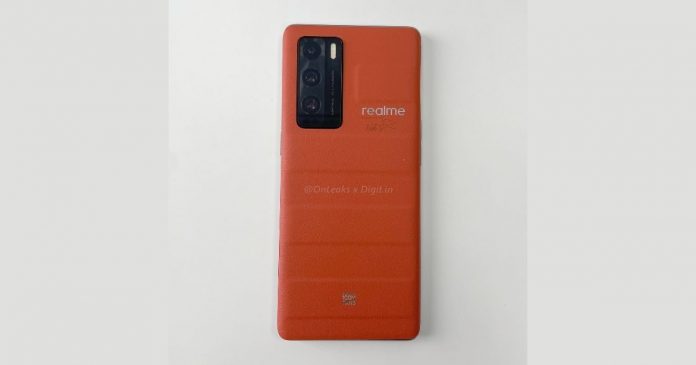
Realme will soon be launching the new Realme GT Master Explorer Edition and the Realme GT 5G. The company has already confirmed that both the smartphones will be launched on August 18 and now a new image of Realme GT Master Explorer Edition has been leaked which seems to be an orange color option. The special color option will be launched in the Indian market to celebrate 100 million global sales of Realme. The image shows an orange back, which has a leather-like finish and a pattern similar to the Realme suitcase. 

The limited-edition color for the phone will only be available in Indian and European markets. It also has a metal badge on the rear which says “100 million fans“. There is no detail about the price at which the phone will be launched, but a lot of details have already leaked regarding the hardware specification. The Realme GT 5G will come with a 6.43-inch AMOLED display with a 120Hz refresh rate. It will be powered using a Snapdragon 778 processor with 8GB RAM and 256GB of onboard memory. 

YouTube video

The phone will be running on Android 11 out of the box and will have a 64MP primary camera sensor on the rear, along with a 32MP selfie camera. In terms of battery, it will have a 65W fast charging support along with a 4,300 mAh battery. The Explorer edition will come with a bigger screen of 6.55-inch and HDR10+ support. It will be powered using a Snapdragon 870 processor and with up to 12GB of RAM and 256GB of storage. The rear will come with a new 50MP primary sensor from Sony and a 32 MP front camera sensor for selfies.

Mi Pad 5 to launch on August 10

0
Image Credit: mysmartprice.com

Mi has been working on a new tablet for a very long time and it was named the Mi Pad 5. However, till now there was no information on its development or launch. Today, Mi has finally confirmed that they will be launching the new Mi Pad 5 on August 10. The company has not revealed any details of the Pad but has only confirmed the launch date. The leaked images do give an idea about the design of the tablet and in the images, it was also seen with a stylus.

Therefore, it is almost confirmed that it will have stylus support. However, it is not yet confirmed if the Mi Pad 5 will come with a bundled stylus or one will have to purchase it separately. The leaked images also confirm that the Pad will have a flat design instead of a curved body. The edges will be something similar to the likes of the iPhone 12. Also, the body of the tablet will be made completely out of metal. it is not confirmed if the tablet will come with 5G connectivity support, but it seems like that it will. 

YouTube video

The tablet series will come with three variants Mi Pad 5, Mi Pad 5 Lite, and Mi Pad 5 Pro. The tablets will have a 10.9-inch screen along with a 120Hz refresh rate and 240Hz touch sampling rate. While the lite variant will be powered by Snapdragon 860, the other two variants will be powered using the Snapdragon 870 processor. What remains to see is the price at which the device will be launched in the market.

Battlegrounds Mobile India iOS launch teased on Instagram

0
Image Credit: beebom.com

Battlegrounds Mobile India has seen millions of downloads on the Google Play Store ever since its arrival in India. However, at the time of launch, only Android users were able to play the game as it was not launched for iOS devices. However, it seems like the game will soon be coming to iOS devices as well. The company has recently teased the launch of Battlegrounds Mobile India on iOS on their official Instagram account. 

In the new post, the company has also announced that they will be giving amazing rewards to gamers as soon as the number of downloads counts up to 50 million on Play Store. Initially, it was thought that the rewards will only be for players on the Android device, however, the company has confirmed that all players on the platform will receive the rewards, regardless of the platform they are playing on. Krafton has already been working on the iOS version of the game and last month the news came in that the iOS version could launch very soon in the month of August. 

The new details also match the previous leaks and it seems that the company would launch the game for iOS users by the end of this month. The game already has 46 million downloads, and the rewards will open up at 3 levels. First when the downloads reach 48 million, second at 49 million and the next at 50 million. Battlegrounds Mobile India players are eagerly waiting for the iOS version and will soon be able to get their hands on the same.

Motorola Edge S Pro made official in China

0
Image Credit: gizmochina.com

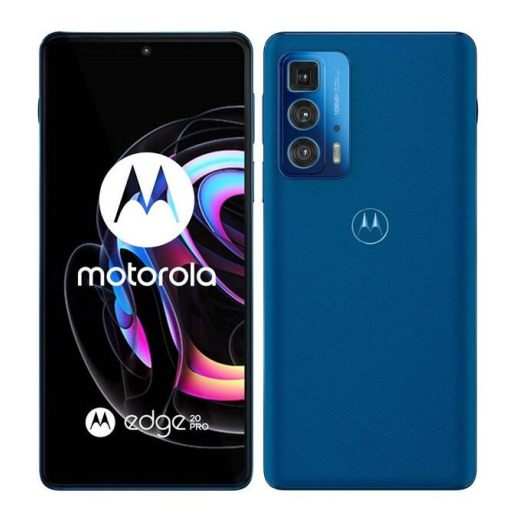
Motorola has recently made Motorola Edge S Pro official in the Chinese market. The company has been sending press invites that mention the phone as one of the slimmest 5G smartphones from Motorola. The phone will be a higher variant of the Motorola Edge 20 series which has already been launched in China. Since the phone has been made official more details about its specification and features are out as well. The phone will be available at a price of CNY 2399 for the 6GB/128GB variant and CNY 2699 for the 8GB/256GB variant. 

The phone with 12GB/256GB configuration has been priced at CNY 3299. The phone is already available for pre-orders in China. There is also a probability that the phone will be launched in the Indian market by the end of this month. Also, soon after the launch in India, the phone will be made available in the global market. The phone comes with a 6.7-inch OLED screen which has a 144Hz refresh rate and 576 Hz touch sampling rate. The phone is powered using the SNapdragon 870 chipset and also comes with a 108MP camera sensor on the rear. The front gets a 32MP selfie camera sensor. 

YouTube video

Earlier the same specification was also found in the details of Motorola Edge 20. However, the company has seemed to change the name of the smartphone and rebranded it to Motorola Edge S Pro. The price of the smartphone seems to be very competitive as per the specification and would be really interesting to see if the same price is tagged to the smartphone during its launch in India and other global markets.

Realme Flash hardware specs leaked online

0
Image Credit: 91mobiles.com

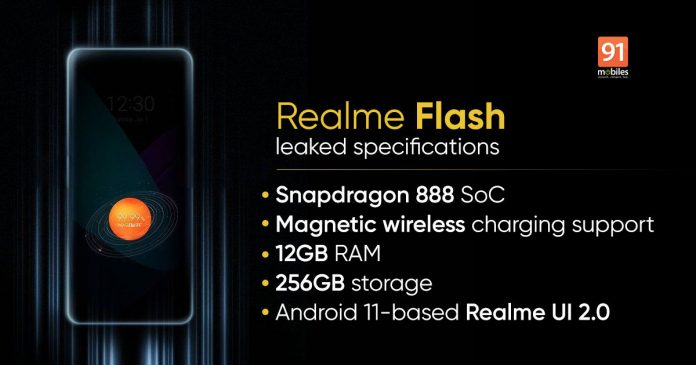
A couple of weeks back, Realme made an announcement about the upcoming smartphone in their lineup which will have magnetic wireless charging support. It is very much similar to the MagSafe technology that is present in the iPhone 12 series. They also announced that they will launch the first Android smartphone in the world with this feature and named the smartphone Realme Flash. However, the company did not reveal any details regarding the specifications and features that it would include. 

Recently, some details about the Realme Flash have hit the internet and the one giving it is tipster Abhishek Yadav. As per the hardware specification leaked by him, the phone will come with a 6.7-inch E4 AMOLED QHD+ display, which will also support a 120Hz refresh rate. The phone will also be powered using the latest Snapdragon 888+ chipset from Qualcomm. Since it will come with MagDart charging, it will support 65W fast charging and a 4,500 mAh battery. 

YouTube video

The phone is expected to come with a triple camera setup on the rear which would include a primary 50MP camera sensor and a 32MP selfie camera sensor. Realme has also announced a lot of different MagDart accessories which would allow the user to charge their device wirelessly with up to 50W fast charging support. Although there is no release date announced by Realme, we can expect the phone anytime next month. Once the phone is released, we also expect to see a lot more accessories in the market using the magnetic feature.

Samsung Galaxy M32 5G spotted on GeekBench, could soon launch in India

0
Image Credit: 91mobiles.com

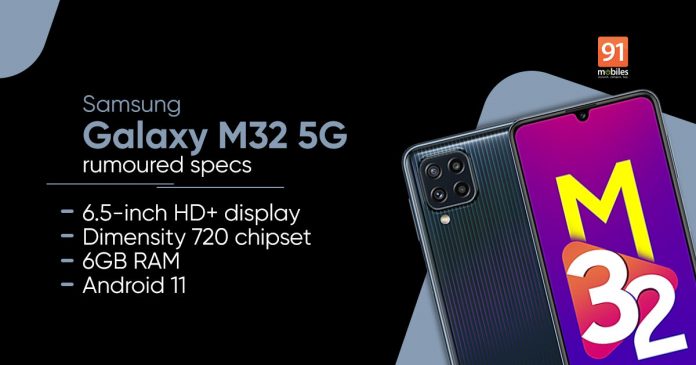
Samsung Galaxy M32 5G can very soon be launched in the Indian market as the smartphone has been completely developed and has recently been spotted on GeekBench. The phone has also made it through the BIS certification and Wi-Fi Alliance which is required by the phone before it is launched in the Indian market. It could be that the phone is launched within the last week of this month. Samsung has also listed the smartphone on the support page for the Indian website. 

The model number for the smartphone that has been listed is SM-M326B/DS, however, no other details about the smartphone have been listed. As per the leaked details on the web, the M32 5G will have a similar configuration as compared to Galaxy A32 5G, which is already available in the market. Although it will have certain changes and differences, on the most part, the phone will be very much similar. The benchmark test that has been conducted on Galaxy M32 5G, has already revealed that the phone will come with a Mediatek processor, DImensity 720. The phone will also come with a 6.5-inch TFT screen. 

It will also come in various RAM configurations like 4/6/8 GB and memory options of 64/128 GB. The phone will also come with a 48MP primary camera sensor in a triple camera setup, with a 13MP selfie camera. The phone will be powered using a 5,000 mAh battery and 15W fast charging support. Apart from these details, nothing else has been revealed about the phone. It is expected that the company will soon make the announcement for its release.

8 Best Fixes for WiFi connected but no Internet Issue

0

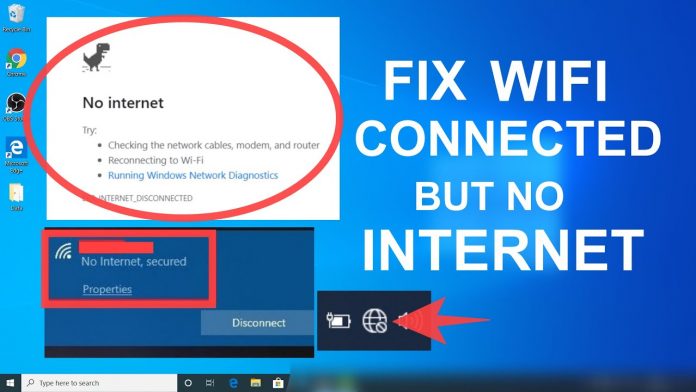
WiFi connected but no Internet: You must have faced an issue at least once in your life where the device connected with the Wifi network does not provide you with access to the internet. Although the Wifi is there, there is no internet connection. Now there can be multiple reasons due to which it can happen and finding the one specific reason for the same could be time-consuming.

There are a lot of different error codes which might be displayed or your device would simply not connect to the internet in any way. In order to resolve the Wifi connected no internet issues, it is important that you identify the source of the problem and for doing so you will have to understand whether the issue is with the hardware or the software.

Identifying the wifi connected but no internet issue source

When it comes to the no internet connection error, the first thing that you would need to check is whether the issue is with your device or with the Wifi Settings and router. To check for the same simply try to connect the Wifi network with a different device.

If it connects successfully and you are able to access the internet on a different device, then the issue is not with the Wifi network or router and the issue is with the device on which the internet is not working. Similarly, if the Wifi connects on the second device, but you cannot connect to internet, then the issue might be with the router, modem, or the internet settings from the Internet Service Provider.

Doing this will not only rule out many different reasons for the issue but you will be able to focus directly on the source of the problem. In both cases, if the issue is physical, like the wires are not attached properly or the Wifi adapter is disconnected or something else, the best option would be to restart the device, which usually solves the issue almost immediately. In case the issue is with the Wifi Router, simply follow the below-mentioned steps.

  • Switch of the Router and Modem
  • Wait for at least 30 seconds before switching them on again
  • Now, wait for another 1-2 minutes before connecting your device to the Wifi network.

In case the issue of internet connection problems is with the device or system, then you can restart the machine and try connecting to the Wifi network again. Restarting the device will not only clear the cache memory and will refresh the setting, but will also resolve most of the common issues with the machine and router.

Different ways to resolve the WiFi connected no internet issue

Even though you are able to identify the major source of the “internet may not be available” issues, there are still a number of reasons due to which the issue is occurring. There are a few common things that one can do through which the issues can be resolved most of the time. These might require the user to do some troubleshooting and are fairly easy to follow.

Network troubleshooter

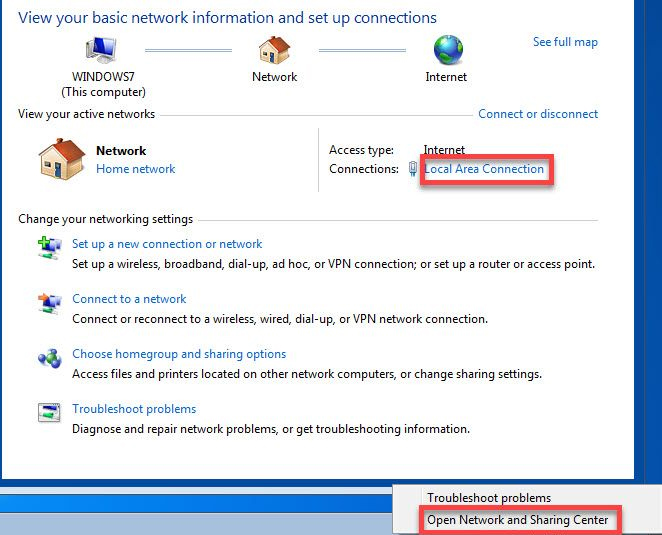
This is the first step that the users should do in case they are facing an internet connectivity issue. One can simply check the network settings on the PC and troubleshoot the problem from there. Simply right-click on the Network icon which is placed on the Task tray on the bottom right of the screen. From there select the Troubleshoot option.

Network troubleshooter - WiFi Connected No Internet

The best part about this is that the Windows operating system will automatically check the network settings for any kind of issue. When detected, it will provide you with the options to resolve it automatically. Once completed, the issue will automatically resolve and you will be able to access the internet on the machine. This is one of the most commonly used resolutions for wifi connected but no internet issue

Update the Wireless drivers

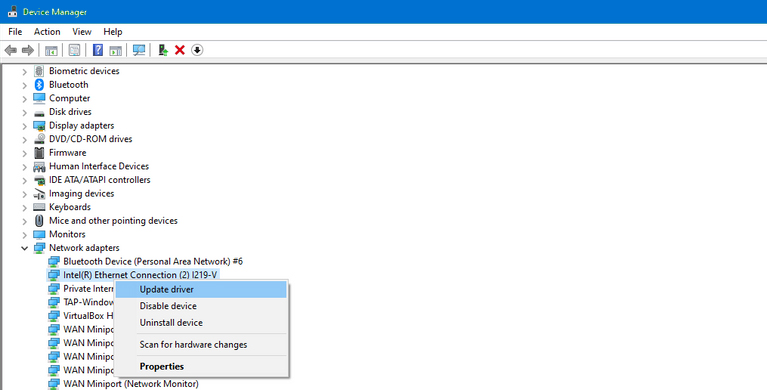
This might not be a common issue with all, but it is something that can cause the no internet connectivity issue on the system. Simply check the Windows and the manufacturer’s update list for any kind of new drivers for your wireless devices. In case there are new updates, download and install them on your system. Once done, simply restart your system once and try to connect with the Wifi network for internet connectivity.

Update the Wireless drivers - connected no internet

DNS issue

DNS issue - wifi connected no internet

In case the device, PC, or laptop you have connects to a different Wifi Network and works fine, but does not work on a specific Wifi network, then the issue seems to be with the DNS settings of the network. In this case, you would simply need to flush out the DNS which will help to remove the DNS cache of all the addresses from your device.

It is like refreshing the DNS cache of your device. Once done, you will be able to connect to the internet on the device for the particular network. To do so, one can simply press and hold Windows key+R and type ipconfig /flushdns. Press enter key and after it is over, try to access the internet again.

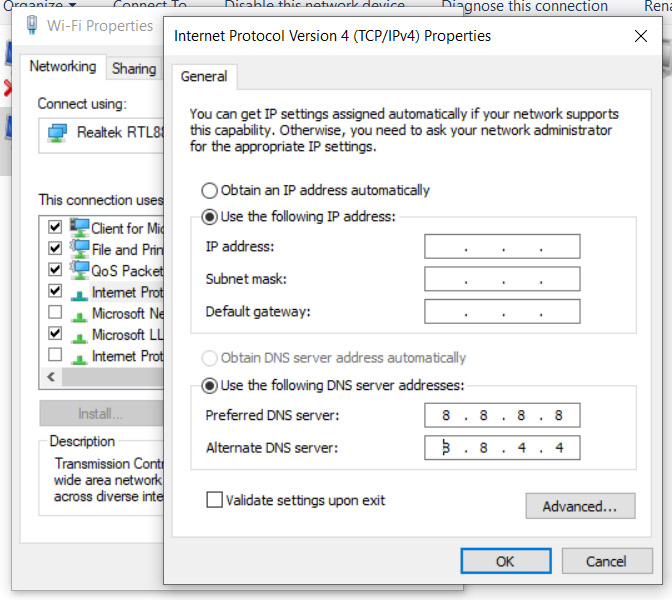
Apart from this, you can also set a fixed DNS which will tell your device to use a fixed DNS server every time. This will resolve most of your internet connection problems and especially when wifi has no internet access. To do so, right-click on the Network Connection under Network settings and select Change Adapter. Select the option of Wifi Adapter and select Properties. Select the Internet Protocol version 4 (TCP/IPv4) option and click on properties to select the “Use the following DNS-Server” option. There you can use the most common and reliable DNS servers 8.8.8.8 and 8.8.4.4

Try changing the network standard

With the modern Wifi connection, you might have observed that they come with a dual-band Wifi network based on 2.4Ghz and 5Ghz, which latter being fastest. In case you are connected to one of the bands, try changing it and select the other band settings.

For example, if you are connected to the 5Ghz connection on the Wifi network, try selecting the 2.4Ghz and check if the internet connection still works on any device. You can also turn off the 5Ghz settings if you do not have any on your Wifi network from “Change Adapter Options” under Network connections.

Antivirus programs and firewalls

It is common for errors like “internet may not be available” that have been caused by a setting applied from antivirus software. Many antivirus software stops the device from sending data outside through a network, causing wifi connected but no internet issue. In such cases, users can simply try to disable their antivirus software, restart their system and then check if the issue still persists. If the issue still continues, you can enable your antivirus program again.

Check with your ISP

If your devices are still connected but no internet, then it would be better to call the ISP and check if there is an issue at their end. Also, ask them to troubleshoot the issue for your interconnection from their end if possible, or if they can detect and resolve it. If the issue is from the end of the ISP, they will automatically resolve it for you or will send someone to your place to resolve it.

Sometimes, there is also an issue with the wiring outside your premises which can be resolved by a visit from the technician from the company. So make sure to ask them to make a routine check to see if a wire outside is cut or disconnected.

Reset your network settings

Reset your network settings - why is my internet not working

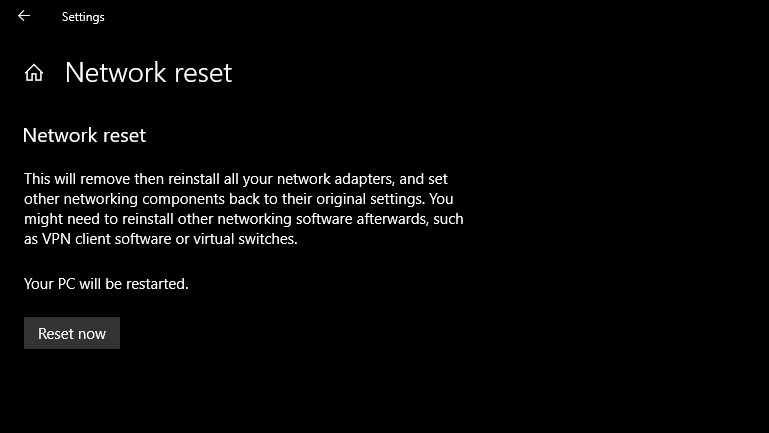
One of the most commonly used resolutions in case of wifi connection but no internet access is to reset the network settings. It is also one of the common ways through which many users have been able to resolve the issue easily. It will not only reset the network settings but will remove all the network adapters, and settings to default.

Returning the settings to default will provide you with the best possible network settings once again. To do so, simply go to Network and Internet settings and click on the Status option. There you will find the option for “Network Reset”. Once done, simply restart your computer and try connecting to the internet once again.

IP Address conflict

Another issue that might occur very commonly on Wifi networks is the allotment of the same IP address to more than one device. In such cases, both the devices are unable to connect to the internet although they are connected to the Wifi. Although these internet connection problems are rare, it can be one of the issues due to which the issue is being faced.

To resolve the issue, one simply has to open the command prompt and type the command ipconfig/release. This will help to assign a new IP address to the machine, after which you can try to connect to the internet again.

Conclusion

So here are some of the most common issues that users face for wifi connected but no internet issues and with it are also mentioned some of the easy ways to resolve them as well. If you search online for “why is my internet not working“, these are some of the most common reasons you will find, and troubleshooting them has resolved the issue for almost all the users, unless the issue is from the ISP end.

You can try these troubleshooting methods which will only take a few minutes and one of them might resolve the issue you have been facing. In case you need any help, you can ask a tech-savvy or a professional from the ISP company to help you with the same.

Also Read:
Apple to check devices for content related to Child sex abuse images

0
Image Credit: barrons.com

Apple has always been very strict when it comes to the content, apps, and policies on the iPhone. It makes sure that the data on the phone does not hamper the security and other aspects for the users. Now the company has taken yet another step that is going to be very crucial in terms of Child abuse. They have announced the details of an entirely new system that will detect child abuse content on the device connected to iCloud. The feature will currently work in the US only, however, it will slowly be rolled out globally as well.

When an image is stored by the user manually or automatically on the iCloud, Apple will search the images for any possible match with content related to Child sexual abuse material. In case, any such content is found by the system, it will be reviewed by a human reviewer and reported to the law enforcement agency. Although this is a very good initiative, it also created a stir that it could affect the privacy of the Apple device users. Some experts also state that this could be used by the government to spy on the citizens.

Apple has confirmed that when the feature will be launched later this year, they will make sure that the feature does not intervene with users’ privacy in any way and the data is not shared by anyone. The mechanism just compares the content with the database of known child sexual abuse images compiled by the US National Center for Missing and Exploited Children. It also has a high level of accuracy and Apple has confirmed their long-term plans related to prohibited content on any device.

Infinix to launch Infinix Smart 5A on August 2 in India

0
Image credit: navbharatimes.indiatimes.com

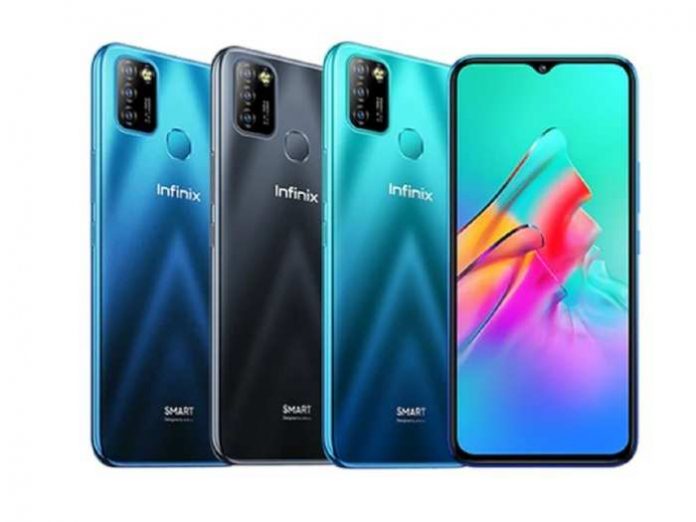
Infinix is going to launch yet another smartphone in the Indian market on August 2, and this time it is the Infinix Smart 5A. The phone has been targeted towards the budget segment and users who are looking for a good performance at a lower cost. It will be the latest offering from the brand in the Smart 5 series and will come with a 6.52-inch HD+ screen which will have a waterdrop notch in the front for the selfie camera. The phone will also come with a large 5,000 mAh battery but nothing has been confirmed about the fast charging support. 

The leaked images of the phone also show that the phone will have a dual rear camera with a pyramid-shaped design on the back panel. The phone is expected to come in three color options of Ocean Wave, Quetzal Cyan, and Midnight black. The phone will be launched on e-commerce giant Flipkart and will launch with an exclusive offer including a Jio network connection. Not much has been revealed about the phone booth on the internet leaks and the company officially. 

YouTube video

The launch comes just after the company has released its first Android Smart TV in the market for just Rs 19,999. It is not the only smartphone that the company is going to release, it already has a lineup for more smartphones released in the next couple of months where they will be targeting both the mid-range and budget market with good hardware specifications on their smartphone. 

Telegram adds a new feature to hold a video calls with up to 1000 viewers

0
Image Credit: beebom.com

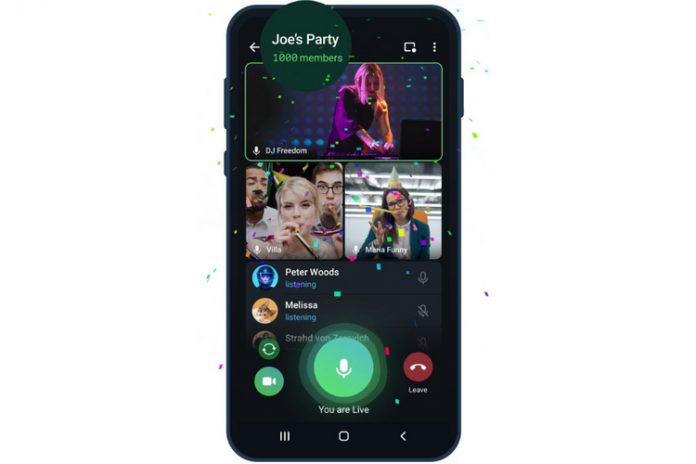
Telegram has been adding a lot of new updates and features on their platform to make it more competitive and better than other messaging apps like WhatsApp. There is no doubt in the fact that the messaging platform has gained popularity in the last few years. Now the company has added yet another update to the platform which not only adds new features but also expands the video calling feature. One of the major changes that the new update will bring is the ability to host a video call with up to 1000 users. 

This will be the first time that users will be able to post such a call with such a large number of users on a messaging platform. Apart from this feature, the users will now be able to send video messages in much higher quality and can also be expanded. Also, the regular videos on the apps could be watched at speeds from 0.5x to 2.0x. One of the other great features that the users will definitely enjoy is the screen sharing and feature including sound for all types of video calls, including the one-on-one video calls as well. 

YouTube video

The company confirmed that the user will be able to broadcast the video call with 30 users but it can be viewed by up to 1000 users which is great for e-learning purposes. Telegram is going to update the app in a couple of weeks again and is going to add a whole new set of features which is definitely going to make the experience of the app much richer for the users.