Home Blog Page 56

Fortnite Optimization: How To Increase FPS In Fortnite(6 Simple Steps)

0

How To Increase FPS In Fortnite: When it comes to the most popular online games currently, Fortnite is definitely among one of them. The multi-platform online Battle Royale games have become very popular since its launches in 2017. The game currently has millions of followers and is known for its diverse gameplay and great graphics. The game has seen huge success in the online multiplayer game segment, and even with many different and popular games in the same segment such as PUBG and Call of Duty, Fortnite has only seen increasing popularity and number of gamers.

The major reason for its widespread popularity is that the game is free to play on Xbox, PS4, PC, and Nintendo Switch. The game has been made with extreme precision due to which the online gaming experience is completely lag-free and the visual appeal of the game is just excellent.

However, there are many Fortnite optimizations available for the game, which can make it look even better and can improve the gameplay for the player. Such tweaks can boost the performance of the game and gives an added advantage to the player. One such tweak allows the users to increase the FPS in the game.

One of the most popular searches online for Fortnite is “how to increase fps in Fortnite“. It is why we have made a list of some techniques that can be used to increase the FPS of the game. It will not only make the graphics much smoother, but the transition from one position or graphic to another also becomes faster and much clear. An increase in FPS will also reduce any kind of lag that you may have faced in the game.

Follow the steps below to Increase FPS in Fortnite

How to optimize the Fortnite FPS on PC

When it comes to playing Fortnite on PC, you will have to agree that the experience is just mesmerizing. The graphics and control on a PC are much better than what you can get on any other platform. However, just like PUBG, which is a similar game and requires a lot of tweaks, even Fortnite requires a lot of customization while playing on PC. There are some things that one should do to prepare their PC for the game.

  • Make sure that the drivers for your graphic card are updated with the latest one so that you can get the best and bug-free performance from the GPU. It will also make the settings of the game much smoother.
  • If you are using a laptop or a machine that provides high-performance mode, then make sure that you activate it before starting the game. It will make sure that all the resources are dedicated to the game while it runs smoothly. If the game is demanding resources and you do not have the high-performance mode enabled, then the game will lag and slow down at certain points where graphics become heavier and more realistic.
  • Make to close all the unnecessary processes or applications on the machine which you are currently not using to provide all resources to the game.
  • Give enough ventilation to the Graphic card in the cabinet to ensure that the GPU does not build up extra heat. If that happens, the GPU will not work properly, leading to lag in-game and decreased FPS.
  • While using the Windows operating system, there is a feature called Windows Update Delivery Optimization feature, which makes sure that the resources on the system are equally distributed for balanced performance. Disabling it is very important for Fortnite optimization, as it will not allow Fortnite on PC to have more resources for performance. Simply click on the Start button >> Search for Windows Update settings>> Click on Advance Option>> Delivery Optimization>> Select Off for “Allow Downloads from Other PCs option“.
  • If you are using any kind of online drive or storage that syncs automatically after a certain time, make sure to turn it off temporarily. Turning it off will make sure that your game does not lag in between the gameplay due to a lack of internet speed.

These are some of the things that you can do to ensure that the game does not lag during the gameplay and it does not create any kind of lag in the FPS. Now let’s have a look at how you can optimize the settings on the game and certain software to improve on the FPS and make it smoother.

Change the Settings in the game

Now to increase the FPS in Fortnite, you can make certain changes to the in-game settings as well. To do so simply launch the game and select the Battle Royale Option >> Click on the setting menu, which are the three lines on the upper right corner, and click on the gear icon (settings) >> Select Full-Screen settings and also select Unlimited options for display frame rate limit. It will make sure that the frame rate or FPS of the game can be increased when the fame requires it.
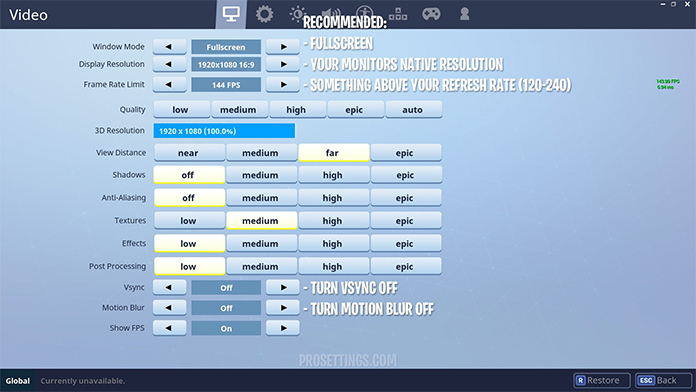
How To Increase FPS In Fortnite through Settings

Apart from these settings, make sure to keep the 3D resolution to 100% and reduce the View Distance to increase the performance in the game. Keep the textures on medium to low settings and place the effects on low. Also, turn off VSync and Motion Blur. Save the settings and exit the game for the new settings to apply in the game. Now what this will do is that it is going to reduce the graphics by a bit and lead to less pressure on the GPU and CPU resources, which will eventually increase the FPS and performance.

Additional settings on the PC

Apart from the setting mentioned above, there are certain additional settings that you can go for. One of them is the optimization of Discord Settings. Simply open Discord and go to the Settings Page. Once you are there, uncheck the option of Hardware Acceleration.

To get more performance and increase the FPS of the game further, you can also optimize the settings for Google Chrome. Since the web browser is one of the most resource-consuming software on the PC, making some tweaks can release a lot of resources for the game to use. To do that simply go to the Settings page on Google Chrome and go to the Advanced tab. Once there, go to the bottom of the page and turn off hardware Acceleration. Now simply relaunch the browser.
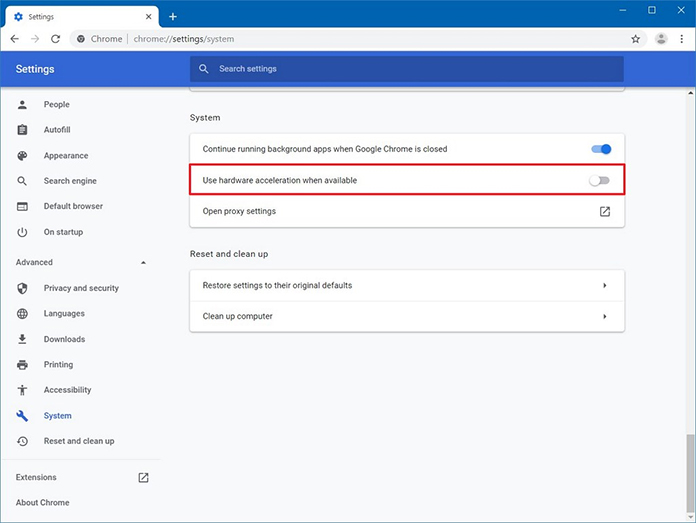
Additional Settings to Increase FPS in Fortnite

Lastly, you can clear the browsing history, cookies, and cache memory in from the browser to make sure that it does not affect the internet speed, which will eventually affect the gameplay. To optimize that, Simply go to the Windows Start button and search for “%localappdata%” >> Go to the Temp folder and select all files to delete them. Also, empty the recycle bin or use third-party software that can clean all the junk files on the system.

Conclusion: How To Increase FPS In Fortnite

These are some of the techniques that you can use to make the gaming experience of Fortnite on the PC much more efficient and faster. It will not only help with Fortnite optimization but will also help to increase the FPS and keep it consistent. Also, since these steps allow you to clear junk files and reduce the load from CPU and GPU, you can expect a much faster performance from the game.

More Fortnite Guides

Fortnite: How To Change Character

Google Meet to add a new low light mode in the web version

0
Image Credit: slashgear.com

Google Meet is trying to add new features to enhance the video quality on their video calling platform. Now, they have added a new low-light feature to the web version of the app as well. The announcement for the same was made through their blog post where they confirmed that the new low light feature will now be made available to the web version as it was already working on the application. The new feature uses AI to automatically adjust the video in such a way that the subject becomes a lot more clear in any kind of dark environment.

The feature was already present last year in the smartphone version of Google Meet, however, the same quality was not found in the web version. It’s not only the dark environment, but the AI will adjust the video in all kinds of conditions. If there is a natural or artificial light source behind you, you will detect it automatically and underexpose the brightness to increase the subject’s visibility. Google has been working on the same tech by making it better with the use of AI instead of hardware.

The same principle of making video and images better through software has also been used in their Pixel smartphone. Google claims that the new feature automatically starts working in the dark area as soon as you enter such a premise. It will adapt intelligently and make sure to increase the visibility to the maximum without any kind of distortion. The feature will be rolled out on Google Workspace, G Suite Basic, and G Suite Business users. Also, it will be available to all the users globally within the next 15 days.

OnePlus and Oppo to integrate ColorOS and OxygenOS

0
Image Credit: indianexpress.com

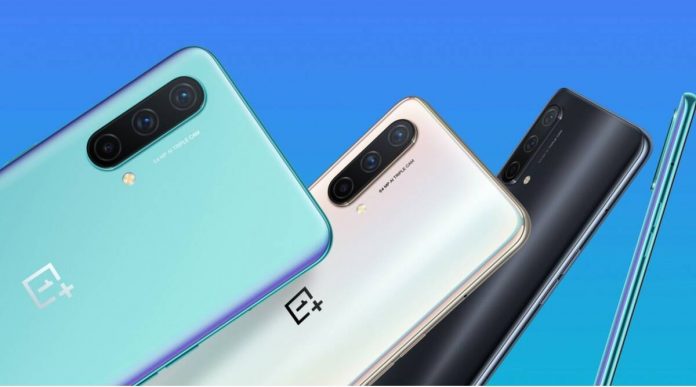
We all know that OnePlus is now working under Oppo while keeping its unique identity. However, both the companies have been sharing technical specifications, design elements, and a lot more. Before the merger, both companies were using different OS skins, which were Color OS and Oxygen OS. However, it seems like both the companies have finally decided to merge both the skins into a new operating system for their smartphones. 

The details were confirmed by OnePlus Co-Founder and CEO and Oppo CPO Pete Lau in a forum. The new operating system would be first used in the OnePlus next flagship that has been planned for 2022. Also, OnePlus has confirmed that there will be no OnePlus 9T smartphone in their T series. As per the companies, integrating their skins will help them to combine the features of both the skins and will provide an upgrade to the overall user experience as well. They will be taking the fast and smooth experience of the Oxygen OS and will combine it with the rich and stable features of the ColorOS. 

YouTube video

The new OS will also provide support of unlocked bootloaders on the smartphone and will also make sure that the user experience is cleaner and light in all areas. They will be integrating the skins by the time the next major update is ready for Android in 2022. The company has not revealed any technical details for the integration but it could possibly be first used in the OnePlus 10. OnePlus is currently also working on multiple new hardware to bring a huge offering to customers at different price points.

HMD Global to launch a new Nokia smartphone and tablet on October 6

0
Image Credit: gsmarena.com

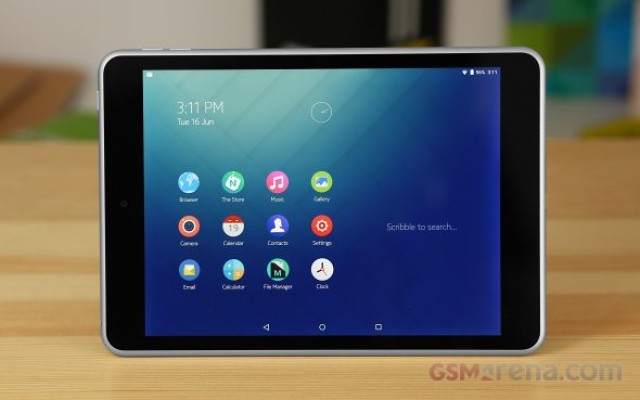
HMD Global has recently announced a new event where they will be launching a new set of Nokia devices. The event will take place on October 6 next month and it is expected that the launch has been specifically arranged for the launch of the Nokia G50 5G smartphone and T20 Android-based tablet. The Nokia G50 5G has been under the news for a very long time with speculation and leaked specs. However, this is the first time, we have finally got the confirmation about its launch. The phone will be 5G ready and is expected to be powered using the Snapdragon 480 5G chipset. 

Also, the phone will come with a large 6.8-inch display, which could be an IPS LCD screen. Along with that, it is expected to be powered using a 4,850 mAh battery which will also have the support for fast charging. However, it has not been confirmed as to what kind of fast charging technology will be used. The phone will come with a triple camera setup and a 48MP primary sensor on the rear. There have also been renders of the phone on the internet alongside a Nokia branded TWS. So it can be expected that the phone will be launched as a bundle with the TWS at an offer price. 

The main focus of the event is the new T20 tablet from Nokia, which is expected to come with a 10.36-inch display, which would be an OLED display as per speculation and will have a configuration of 4GB and 64GB. Although the specifics of the tablet are not known yet, it will be powered using the Android 11 operating system and will support 4G and Wi-Fi for connectivity. After these devices are launched, Nokia will be launching yet another device on November 11, which is still unknown.

Samsung’s Hand Wash app is now available on Wear-OS based Galaxy Watch 4 series

0
Image Credit: timesnownews.com

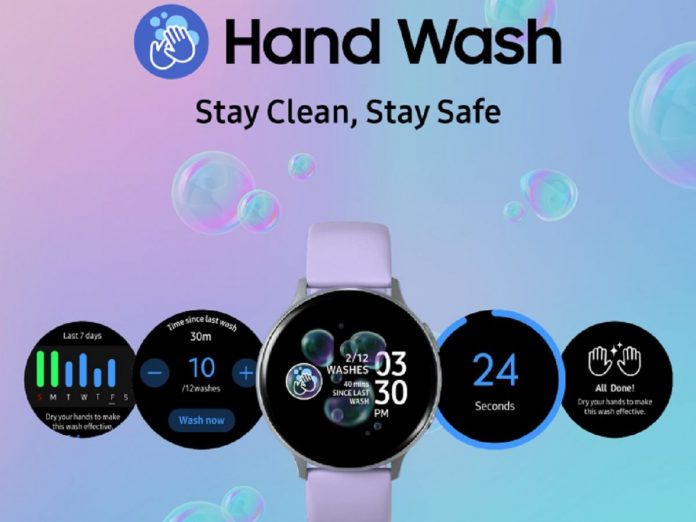
After the pandemic hit the entire world last year, people started to take precautions to make sure that they are not infected by the disease. Due to this, things like washing hands, keep social distance, keeping oneself clean, using sanitizers became common habits for everyone across the world. This was a habit that even smartphone and tech companies wanted to tell their customers about. Last year, Samsung launched a new app called Hand Wash on the smartwatches based on Tizen. 

It regularly reminds people to wash their hands regularly which turned out to be very helpful for people all around the globe using Samsung tech. Now, the company has launched the same app on Wear OS 3-based Galaxy Watch 4 series as well. The app can be easily downloaded from Google Play Store. The best part about the app is that it will automatically detect when the user has washed their hands and will also provide a timer for its to make sure that the hands are washed properly within that time. 

YouTube video

It also provides a dashboard for the users which provides them with the data as to how many times they have washed their hands on a certain day. The file size for the app is 18MB and is currently only available for Wear-OS Samsung Galaxy 4 series. If you have a non-Samsung Wear OS smartwatch, the app will not work. If you have the latest Galaxy smartwatch, then you should surely download this app as it creates a hygienic habit for you in the pandemic.

Microsoft Surface 8 details leak before the launch on September 22

0
Image Credit: moneycontrol.com

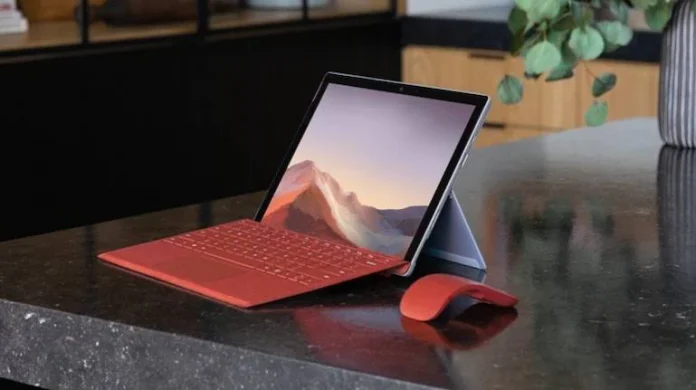
Microsoft is all set to launch its new series of Surface Pro devices on September 22. However, just before the launch of the device, some of the major details for Surface Pro 8 has been leaked on the internet. The details that have been leaked through Twitter confirm that the device will come with a 13-inch display size and will have a 120Hz refresh rate as well. Also, as per the leaks, there is a change in the types of ports that will be available.

It was believed that the device will have USB-A ports, but now, the leaks confirm that it will have a combination of USB-C and thunderbolt ports. The device will be powered using Intel’s 11th generation core processors and will be equipped with replaceable SSD drives, which means that the users will be able to swap it with SSD with higher storage options. It has also been confirmed in the leaks that the device will be running the latest version of the Windows operating system Windows 11.

Apart from this device, Microsoft will also launch Surface Pro 8, Surface Go 3, Surface Book 4, an updated Surface Pro X, and the Android-powered Surface Duo 2. Therefore, there will be a lot of Surface Devices to choose from at this launch. The event is specifically for hardware devices that have been manufactured by Microsoft and there could be more devices in the event apart from the Surface devices. However, we will have to wait for a couple of days before the official launch event takes place.

Apple to roll out iOS 15 and iPADOS 15 update today for global users

0
Image Credit: piunikaweb.com

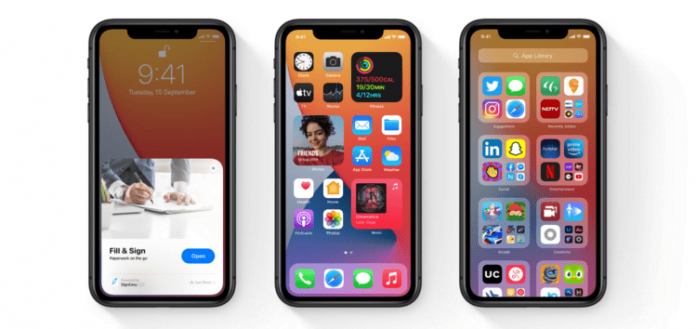
Apple is finally rolling out the next big iOS update from today onwards. The latest version of Apple’s operating system, which is iPadOS 15 and iOS 15, will be rolled out globally today. The company launched their new series of iPhone 13 and a new range of iPads in the market on September 14, and now they have released the new operating system update for them as well. The iOS 15 will bring several new features to the iPhone and iPad. 

One of the major updates that Apple will bring along is the security and privacy feature for data protection, regarding which, the companies like Facebook have already shown their dissatisfaction as it will affect their ad policies. Apart from this, the new update will also allow the iOS 15 device to make direct Facetime calls to Android smartphones. Earlier, the users could have done it only on an iPhone to iPhone, but now the feature will also be available for calling the Android smartphone users. 

YouTube video

Apart from this, the operating system update will also add a lot of new features in the Safari browser, Photos app, and re-designed notifications system. There are also some minor updates regarding the performance of the smartphones and resolution for minor bugs. Although the major update is still regarding security and privacy, which will change the way apps track and use the data of smartphone users to optimize ads on their smartphones. This feature was added to iOS from iOS 14 onwards and will be made much better in iOS 15.

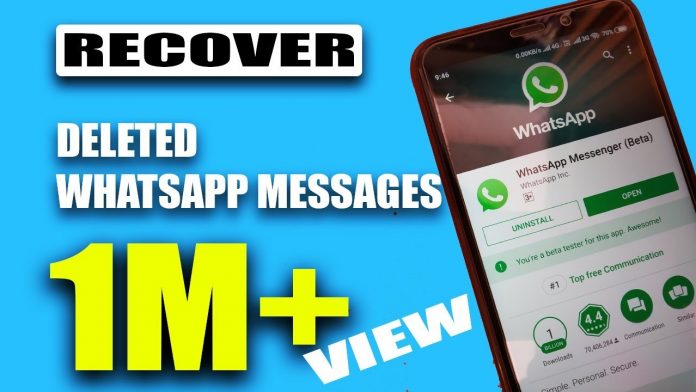
How to Recover Deleted WhatsApp Messages (1 EASY Method)

0
How to Recover Deleted WhatsApp Messages

How to Recover Deleted WhatsApp Messages is a question asked by many WhatsApp users. In this post, we will go through how you can solve this

WhatsApp is one of the primary messaging apps that almost every smartphone user is using right now. Since WhatsApp is absolutely free, the usage of the app is much more than any other messaging platform, which means you will have a vast amount of messages and media sent through the application. However, once the messages on the application are deleted there is almost no way of getting them back. However, there are some techniques through which one can recover WhatsApp Chat History and delete WhatsApp Data. Simply follow the steps and you will never lose your chats again.

How to Recover Deleted WhatsApp Messages Video Tutorial

YouTube video
  • Go to your smartphone and open up file explorer applications like ES File Explorer or Astro or any other similar application.
  • Now browse your memory folder in it and search for the WhatsApp folder. 
  • Now go to Databases, where you will find some files listed. Now pick the latest file as per the date and rename it as Backup-msgstore.db.crypt12. 
  • Now rename the second latest file to the name msgstore.db.crypt.
  • Go to Settings of the phone >> Apps >> Select WhatsApp and click on “Clear Data”.

Now, once you open WhatsApp, it will ask you to set up the account once again, and while doing that it will restore all your previous messages in the account. Any messages you have cleared will be clearly visible as they were never deleted.

Also Read

YouTube video

Realme GT Neo2 pricing details leaked before launch

0
Image Credit: gadgets.ndtv.com

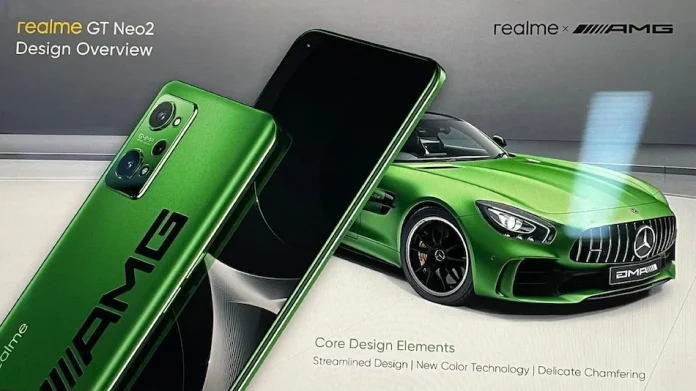
Realme GT Neo2 would be next in the line of smartphones that the company will be launching in the Indian market. The phone will initially be launched in the Chinese market on September 22, after which it will also be launched in other markets like India, for which the company has still not confirmed any date. Although the launch is just a couple of days far, the specifications of the smartphone are already out on the internet, alongside which the pricing details for the smartphones have been leaked for the Indian market. 

The launch will take place in China at 2:00 PM local time and the company will display multiple variants of the smartphones. As per the leaks, the phone will have different configurations of 6GB/8GB and 12GB RAM with the storage option of 128GB and 256GB. The smartphone price is expected to start at CNY 2,499 which is around Rs 28,500 for the starting model of 6GB/128GB. The 8GB/128GB model will cost around CNY 2,699 which is around Rs 30,700 in the Indian market and finally CNY 2,999 or Rs 34,200 for the 12GB/256GB model. 

YouTube video

As per the leaked specifications, the phone will come with a 6.62-inch display which is a Samsung E4 AMOLED screen with Full-HD+. Also, it will offer a 120Hz refresh rate alongside HDR10+ support for the display. The color options that will be available in the smartphone will be Mercedes AMG Special Edition, Blue, Mint Green. The rear will have a triple camera setup which will have a 64MP primary sensor along with a 16MP selfie camera sensor in the front. It will be powered by a 5,000 mAh battery and will offer 65W fast charging through the USB-C port.

WhatsApp stable multi-device feature comes to iOS

0
Image Credit: phonearena.com

WhatsApp has been working on multi-device support for a long time now, but finally, it has been launched as a stable version for iOS users. iOS users who are on the latest WhatsApp version 2.21.180.14 will receive the multi-device feature, which is stable and without bugs. With the multi-device support, the users will not have to keep the device online in order to use it on another device. Simply scanning the QR code will enable WhatsApp on another device, from where you can keep using it as an individual device. 

Apart from this, the messaging app has also started testing a new feature called the in-app business directory which lets the local users find the shops in Brazil. It is currently undergoing testing in Sao Paulo and is expected to become a stable version in a couple of months. Once stable and released in Brazil, it will be further expanded to India and Indonesia as well. The feature will work on all types of business categories, like food, retail, and other types of local services that people are looking for around them. 

YouTube video

The multi-device feature will also come to the Android operating system very soon in a stable version and also the in-app business feature. WhatsApp is all due to launch a horde of new features on both the Android and iOS platforms in the coming days, which will surely give the app the competitive advantage over others and multiple ways to earn revenue.