A new security flaw was found by Google last month in the Windows operating system, known as zero-day vulnerability. Google’s Project Zero was the one responsible to find these issues and provides all the details on how this vulnerability is currently being exploited to its fullest. The vulnerability allowed the hackers to simply take advantage of the Windows Kernel Cryptography Driver security flaw (CVE-2020-117087) to gain elevated privileges in Windows 7, 8, and 10, as well as Windows Server 2008 and higher.
The flaw was being utilized for a long time actively by the hackers in Windows and was not detected for a long time. However, after the vulnerability was reported to Microsoft last month, the company started working on the patch and released it on Tuesday which seems to fix the issue permanently. Although, the Google team gave the companies a time of 90 days before releasing the details of the vulnerability in public, this time they gave only seven days to Microsoft. As per them, the vulnerability was already in the wild and was being used by a large number of users and hackers for a long time.
It is why the details had to be made public immediately in a short period of time. In the meanwhile, Microsoft has also acknowledged Mateusz Jurczyk and Sergei Glazunov of Google Project Zero to bring vulnerability to its attention. The patch will be available to all Windows users and can also be downloaded manually through the Microsoft website. For now, it seems that the issue has been permanently fixed.
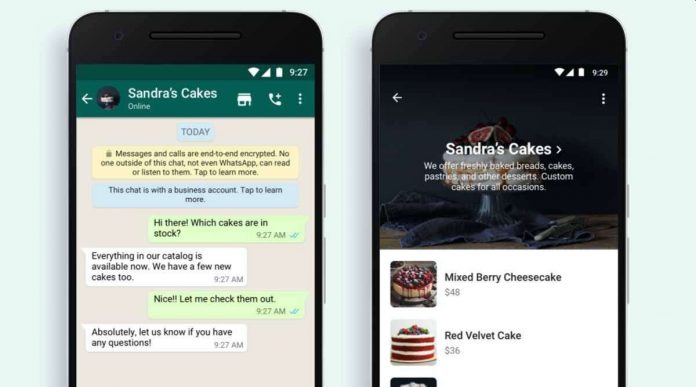
When it comes to online shopping, social media and messenger apps have made a big impact on users who have been trying to sell their products online. Especially for those, who are unable to pay the high commission rates for e-commerce platforms. In the same attempt, WhatsApp has now added a new Shopping Button in the App for global users. The new option will allow people to provide the catalog to the users and help them purchase the things directly from a chat. A few days back, WhatsApp also added the payment option in the app, allowing people to make payments directly to the WhatsApp users.
This integration with the Shopping feature would easily allow the users to make the payment from their in-built payment feature. The tool will allow the users to discover a business catalog so that they can know about the goods and services it offers. Before the addition of this option, the users would have to click into the business profile to see if there is a business catalog available. As per the official statement from WhatsApp, “Now, when a person sees the shopping button, which looks like a storefront icon, they will immediately know the business has a catalog so they can browse products and start a conversation about an item they see with just one tap.”
The feature will surely make it easier for people to manage their business and services in a much better way from WhatsApp. The new shopping button will be replacing the voice call button, for which you will now have to select the call button to select between a video or voice call. The company will be adding more features for business users in the future to make WhatsApp better for business account users.
Google has been facing a lot of antitrust issues in multiple countries and this time another probe for the same has been initiated in India. India’s antitrust regulators have filed a probe against Google for abusing its dominant position to force app makers to exclusively use its billing system for in-app purchases and for bundling the search giant’s payments app with Android smartphones sold in the country. There were many complaints against Google that were received by the Competition Commission of India (CCI), being a total of six counts due to which they launched an investigation on two of the violations of antitrust rules.
The other four complaints did not turn up with enough proof due to which they were not taken into consideration. The two issues on which the probe has been launched are, “exclusivity regarding the mode of payment for the purchase of apps and in-app purchases” and “pre-installation and prominence of Google Pay on Android smartphones“”. The tech giant has also been accused of placing Google Pay of prominent placement in Play Store and search advertisement manipulation on Google Store.
The complaint was basically made by Indian Startups against Google as they also believe that Google is making policies leading to unfair competition. If found guilty, Google can also bar Google Pay from being bundled on Android Phones. Google has also mentioned that these issues will be correctly answered by them and they will always make sure that the Play Store provides competitive and equal opportunities to all.
The new series of Redmi Note 9 will be launched very soon, with frequent leaks appearing on the internet. The last few weeks have given us almost all details about the new models of the Redmi 9 series and how the devices will be able to give a great performance with Snapdragon and Mediatek chipsets. However, till now the details only included details about the specs and design and not the price. However, the new leaks bring details about the expected price of the smartphones in the market at the time of launch.
As per the details, the Redmi Note 9 Standard Edition would be launched at a price point of CNY 1,000 while the Redmi Note 9 Pro 5G or the High edition will be priced at around CNY 1,500. Now since both the smartphones support the 5G band, these would become one of the cheapest 5G phones in the market now. If the price is converted to Indian price, it turns out to be Rs 11,000 and Rs 17,000 only, which is one of the best pricing yet for any 5G smartphone in the market.
If Xiaomi launches the standard edition for the same price regardless of the countries or market, with 5G band support, this handset could give some serious competition to other brands, which have not been able to provide the 5G support in the same price tag. Since the Redmi series has always been focused on bringing value for money smartphones, this one would truly come up with some pretty impressive sales in the future.
When it comes to games that have been developed by Microsoft, one of the most popular has undoubtedly been “Halo“. One of the most popular among the series of Halo was Halo 4 and was only available on Xbox console, due to which many Halo fans were unable to play the game as they did not have a console. However, Microsoft has now decided to release the Halo 4 series on PC next week, which has brought a wave of joy among the fans.
The announcement was made by 343 industries that Halo 4 will release for PC, eight years after its original release. The game will be released on November 17 and will be the final installment of the Master Chief collection. The game has been fully optimized for PC and will feature a new fully remastered campaign. The game will also bring in support for 4K UHD resolution and 60fps, as well as PC native settings such as customizable mouse and key support, ultra-wide support, and field of view customization.
The multiplayer genre of the game will be updated with 25 different maps with updated armor customization and Spartan Ops mode. The game will be released as the final part of the “Master Chief Collection”, which was originally released in 2019. The game will also be released as a next-gen release on the Xbox Series X and S, which will be fully optimized to play in 120fps, as well as 4K resolution. It is surely good news for all the Halo fans that had been expecting to play the series on PC.
Whenever we visit a website on the Google Chrome browser and click on a link, it either opens up in a new window or a new tab in the same browser window. This is a feature that is currently controlled by the website authors as per their choice. However, Google has found a known security issue in this attribute which lets newly opened pages utilize JavaScript to redirect you to a different URL. This is considered to be one of the more serious threats as it could take the users to a spam page or a page with malware on it.
Due to this, Google has added a new security measure to Chrome, where website authors can already prevent new tabs from using JavaScript to redirect to a different URL by using the rel=” no opener” HTML link attribute. The same feature has already been featured in Apple’s Safari browser in 2018, which automatically implied the no opener attribute on HTML links. The same feature was also introduced in Chromium last week and can also be introduced in all Chromium-based browsers like Microsoft Edge, Google Chrome, Brave, etc.
The feature has already been enabled for Chrome users and will also be a part of Chrome 88, which is all set to launch in January next year. This new security measure comes just days after Google patched two zero-day vulnerabilities in Chrome. Google has recently been trying to find out more vulnerabilities in its online services to resolve them immediately and protect users’ data.
When it comes to online video streaming there is no better platform than Youtube, which is the largest collection of videos to watch from. However, the users have been unable to watch videos on the platform lately. If you have also been facing the same issue, then it’s probably not just a coincidence. Recently, many users have been unable to watch videos on Youtube with the loading part stuck for a long time, while the video does not work.
Youtube team has already recognized the issue and has tweeted the same from its official social media channel. As per the update, they have informed their users that their team is already aware of the issue and they are working on the fix. The same will be updated through their Twitter handle as soon as the issue has been fixed. As per Youtube, the issue has been spotted with users all around the world and includes countries like the USA, Nigeria, India, etc.
They have not revealed anything about the issue that is causing the outage but assures the users that it will be resolved soon and they will be able to watch the videos soon. For now, it would be a much better option for you to look for alternatives, especially for those who have been hooked to Youtube throughout the day. It might be a good time for you to take the eyes from your phone away and indulge in other activities, such as book reading or doing other things.
OnePlus 9 leaks have become really frequent now and as per the new leaks, key features and design has come to the light. The details have been leaked by tipster TechDroider, on Twitter. As per the latest leak, three different variants of OnePlus 9 have been spotted which would be called the OnePlus 9, OnePlus 9 Pro, and OnePlus 9 Ultra or OnePlus 9T. Another interesting fact about the leak was that all three devices will be powered by the same processors Qualcomm Snapdragon 875, which is due to release in December by Qualcomm.
When it comes to the design of the phone the front screen will have a punch-hole display and a selfie camera in the front. Another change that has been spotted about the three variants is the inclusion of 144Hz displays in the phone and IP68 certification for the smartphone body. The smartphone will also support NFC and will have dual stereo speakers for loud audio. The phone will also have fast charging support, however, it might be different as per the variant.
The OnePlus 9 leaks hint at 40W and 65W fast charging, where it will be based on the variants. Currently, there is no information about the launch of the device and neither OnePlus has made any kind of official comment on the same. However, these features will most probably be also part of the final product. We can expect many more leaks in the future until the phone is released in the global market.
The announcement of the new Xbox X and S series a few months back brought a lot of excitement to Xbox fans as to when the console will be available to purchase. Now the console is finally here in the Indian market and is available for Rs 49,990 for Xbox series X and Rs 34,990 for Xbox series S. The gaming console can be bought from multiple platforms like Amazon, Flipkart and Reliance Digital, and other offline retail stores as well.
This is the ninth generation of gaming console from Microsoft and is the follow-ups to the older version Xbox One X and One S. The series X is targeted specifically for those, who need complete powerful performance with 4K ready TV, while the Series S has been targeted for casual gamers who are looking for a more affordable option. The series X has a vertical design and a completely black finish which makes it look more stealthy.
The series X can provide 12 teraflops of performance and has a faster 16GB RAM to go with. While the games can run at 4K resolution at 60 frames per second, the console will also provide a 1TB SSD for storage, leading to less waiting time. The series S on the other hand is completely a digital edition, which means that you will not have the traditional disk drive slot. It’s half the size of the X series and the games can run at 1440p with 512GB SSD for less loading time.
When it comes to Macbook, they are known for their speed and performance compared to any other operating system such as Windows. It is true that when you are using the mac keyboard shortcuts, it is very hard for a person to shift on a slower operating system like Windows. MacBook Air has been one of the most popular laptops from Apple and is known for its compact form factor, which is packed with a powerful and efficient processor.
There is no doubt that Macbook Air is much faster than any other laptop in its range.
Did you know that a few Keyboard shortcuts on Macbook can make you even more efficient and save a lot of your time?
Thanks to Apple’s integration of hardware and software, you would have to rarely reach out to your mouse or trackpad for a function. In this article, we will look at a few popular and unknown keyboard shortcuts on a Macbook air, which can be useful in your day-to-day use.
The first thing that you need to know about before using the mac keyboard shortcuts on the Macbook is the Command key, which is located on the bottom left of the keyboard, and you can easily find it with the “⌘” sign over it. This key, combined with the other keys on the keyboard, will be used for all the shortcuts.
Typically the user has to press and hold this key and press the other key to use the shortcut. Let’s look at some of the most useful keyboard shortcuts that you can use with the Command key.
Quick Search
instead of searching for a single file on your Macbook, the best way is to search for it. The shortcut for displaying the search bar is the Command+Space key. As soon as you press it together, the search bar will prompt up, also known as Spotlight. Enter the file name, and it will show it to you in seconds. You can use the shortcut to find any file on your Macbook.
Closing an app
Whenever you hit the “X” button on the top left of the screen, the window closes in Mac, be it a browser or application. However, it does not quit completely and is still minimized in the Dock for use. One can use the Command key+Q to close any application window immediately. It will not just minimize it but will close it completely. It is a great shortcut for closing multiple applications or windows on Mac.
Screenshot
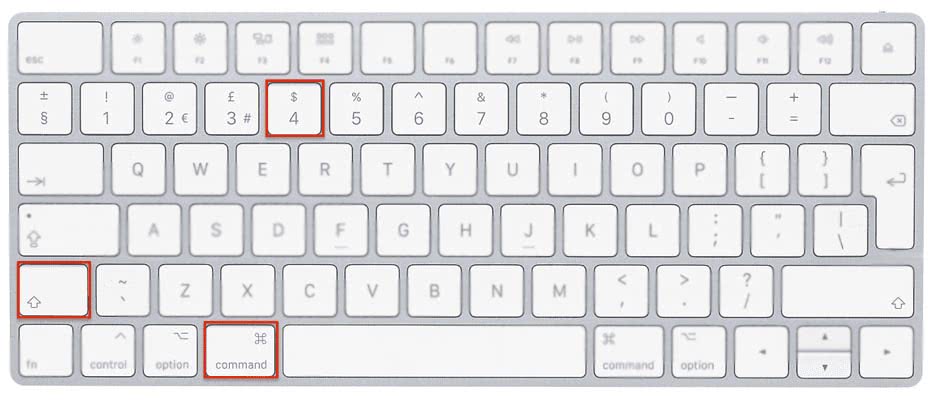
Taking a screenshot on the Macbook is very easy on Macbook using the keyboard shortcuts. Use the Command+Shift+3 key together, and a screenshot will be saved on your desktop. Another variation to this screenshot shortcut is using Command+Shift+4, where pressing these keys gives you a cursor, which one can drag across the screen to highlight and taketh screenshot of a specific area on the screen.
The last variation will replace the numeric 4 key with 5. One has to press the Command+Shift+5, which will give you the option of capturing the entire screen, capturing a specific window, and capturing a specific portion of a window. It also allows you to record the video of the entire screen or a part of your screen.
Hide all application
When you need to minimize all the applications or windows on the screen immediately, then the best shortcut for the same is Command key+H, which will automatically hide all the application windows. It is a really useful shortcut, especially when you have multiple windows and applications open.
Switching between active application
If you have more than one application open at one time and want to switch between their windows, you can press the Command+Tab key on the keyboard for immediate switching between them.
Locking the Mac
If you are looking for a shortcut to lock your Mac while you immediately have to move or go somewhere, or are stepping away from your desk, use the Command+Control+Q key to lock the system immediately. It is a way faster approach than locking the system from the menu bar.
Force Quit
In case any of your application stops working or is not responding to any comments and clicks, you can use the Command+Option+Q key to open up the force quit menu, where you can see the list of all the active applications. There you can select the application and immediately close it.